

Last month, I took a leap of faith and decided to purchase the newly released (and pricey) Asus ROG Flow Z13 2025. It is a laptop-tablet hybrid that features AMD’s latest 16 core, 32 thread Strix Halo APU, the Ryzen AI Max +395 with Radeon 8060s integrated GPU. This APU is so fast, that it now rivals Apple’s latest M4 chip.
I bought the 32GB variant, as I won’t be using LLM and offline AI models that much. But what I do want is a snappy processor that can run multiple programs, web browsers and more without any hiccups. I even made a last-minute decision to post all my work stuff to this device and used it as my work laptop replacement and my productivity has increased tremendously. Gone are the days where I had to wait several minutes for my old work laptop to boot up. Gone are the days where printing a single PDF document can literally freeze my desktop.
The display is top notch and the versatility as a laptop and a tablet allows me to quickly convert this device on the fly, whether I am at my desk, or in the lab, referring to my lab notes.
Now that I am using this for about a month at home and at work, here are my thoughts.
- Processor is overkill.
The 16 core 32 thread APU from AMD is simply overkill. This small laptop tablet hybrid has more cores that my gaming desktop, which is equipped with Ryzen’s gaming CPU, the 7800X3D. I have never experienced any slowdowns at all so far and I am quite confident that this device will last a long time. It can definitely perform well in more demanding tasks in the future.
2. Battery life is above average.
While battery capacity is great, (which is essential since this is a rather power hungry device), battery life is just above average overall. Nothing beats Apple’s Macbooks. Those things literally sip power from the battery and can still perform just as powerful. It’s just that super efficient, something AMD and Intel CPUs are still catching up. That is not to say that battery life is terrible, depending on how you use the device, it can technically last the whole day, but I will definitely feel more comfortable with a charger nearby. The good thing is that the USB-C ports in this device can be used to charge this device, so you don’t really have to bring along the original 200W power-brick that Asus provided to charge and provide power to the device.
3. Screen is gorgeous, with high refresh rate.
The screen, while it is an IPS display, it is one of the best IPS display out there on a mobile device. While OLED is still superior in giving deep blacks and that each pixel is individually lit, the IPS display on the Asus ROG Flow Z13 is sufficiently bright and sharp, with excellent viewing angles. The contrast is better than most IPS displays out there and that ‘dirty’ screen effect normally associated with IPS display panels are almost non-existent. Perhaps IPS panel displays have come a long way. The wide viewing angle is a great feature for someone like me that uses this device mostly for work, rather than for gaming or watching movies. And 99% of the time, I use this device on a brightly lit room, so having an IPS display is perfectly fine. A great plus is the high refresh rate panel that it uses which makes using this device silky smooth.
4. Speakers could be improved.
The speaker system in this tablet could be improved. At maximum volume, it sound a little bit tinny. The lack of bass is a little bit disappointing, given that it has two stereo front facing speakers at the back of the display panel with appropriate cut-outs to allow sound to be directed to the user directly. Again, they could really look into the speakers used on Apple Macbooks which is loud and boomy and not tinny or sharp at all at high volume. But nonetheless, it works ok and overall clarity is good.
5. Storage expansion slot options is a big plus.
The tablet comes with an accessible slot at the back that allows for easy upgrades to the SSD storage space. The tablet currently comes with a 1TB SSD which can be upgraded to a high capacity one in the future. All you need is a simple screwdriver and you can easily swap it out.
There is another option to expand storage space and that is by inserting a high capacity microSD card in the microSD card slot. While read and write speeds might to reach to a level commonly seen in SSDs, but it is super convenient and is great for storing files that are not commonly accessed.
6. Chiclet style keyboard is great, but the backlight is super dim.
The chicklet style keyboard might be divisive for some. For me personally, I love it. The removable keyboard is actually pretty solid and while typing, even typing firmly, there is barely any downward, bending movement. This keyboard is meant to be perform like a workhorse. The size is almost like a 60% keyboard for desktop. It does not have a dedicated number pad, but it does have an additional row of function buttons to allow quick access to certain features like volume, mute, screenshots, panel brightness and more on top of the generic function buttons. I can type text accurately on this keyboard and the key travel is quite satisfying.
The backlight though, is super dim. This being an Asus device, you can fully customise the lighting effects of the keyboard. However, on a brightly lit room, you can barely see the light bleeding from the from beneath the keys. In a super dark room however, you can, so there is no need to worry about not being able to see the keys in total darkness. Just don’t expect to be wowed by the RGB effects coming out from the keys. I am not sure why it is super dim, perhaps its just a way to conserve battery, or this being a detachable keyboard, that aren’t a lot of power draw to the keyboard from the device through the metal prongs that connect both hardware together.
7. The overall build is phenomenal.
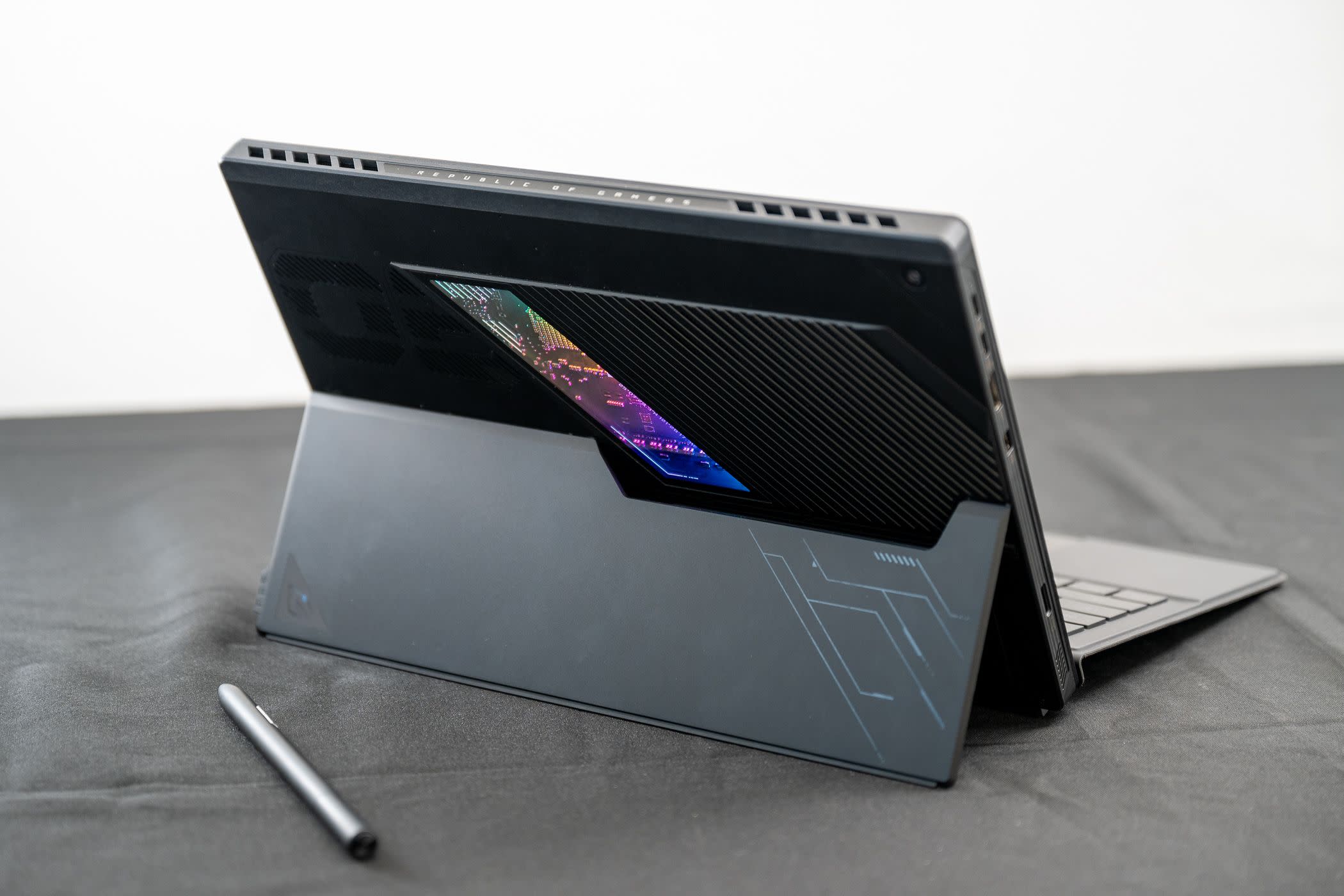
This device is meant to be brought around in all sorts of conditions. The stand is made of metal, which is superb and it comes with a pair of solid hinges that allows the metal flap holding the device at an angle to go all the way down, allowing the laptop to function like a drawing tablet. The back case is also made of metal with a neat little glass cut-out with RGB lights all around the sides, illuminating the device’s internal circuitry. While not necessary, it does enhances the overall aesthetics of the device, making it much more premium looking than without it. That little transparent window adds just a little hint of playfulness, without being too gimmicky. For the price that I paid for this device, the materials that they used were well justified and it feels premium just by holding it in your hands. This is not some cheap plasticky gaming laptop. This is a hybrid device, one that is able to stably support itself on the table and be able to hold comfortably on your hands.
Overall I personally feel that this device is really special. Meticulously designed with a hybrid function in mind, powerful and efficient APU, all in one neat little package. I have never been excited or so looking forward to using this device since my university days when I first got my hands on my Macbook. Asus potentially have a winning device in their laptop lineup, one that will surely gain popularity as integrated graphics improve over time in terms of raw performance, so that we can have a mobile device that does it all.

 thecosmopolitanwanderer.blog
Leave a comment